
ActivePDF NewServiceAccountSetup Utility
What does the NewServiceAccountSetup utility do?
The NewServiceAccountSetup utility is used to update the DCOM permissions for the DocConverter service account when a customer changes it from the default account or from the account currently in use.
- Specifically, the utility:
- Updates DCOM permissions for the configured DocConverter service account.
- Executes dcomperm.exe to apply the required DCOM permission changes.
- Updates the DCService.json configuration file so DocConverter can track the currently configured service account.
- Removes the new service account warning that appears during service startup and conversion operations once the utility has been successfully run.
- After installation, the APDocConverter.NewServiceAccountSetup.exe is located in C:\ProgramData\ActivePDF\Utilities.
How does DocConverter determine that a new service account has been detected?
The current log on account is stored in DCService.json in the DocConverter settings file. If the log on user is changed, does not match that stored in the settings, then you will see warnings when the service starts or when an Office conversion is performed.
Scenario 1: Changing the DocConverter service logon account
1. Change the ActivePDF DocConverter service logon account.
2. Restart the DocConverter service.
3. A popup warning appears indicating a new service account has been detected.
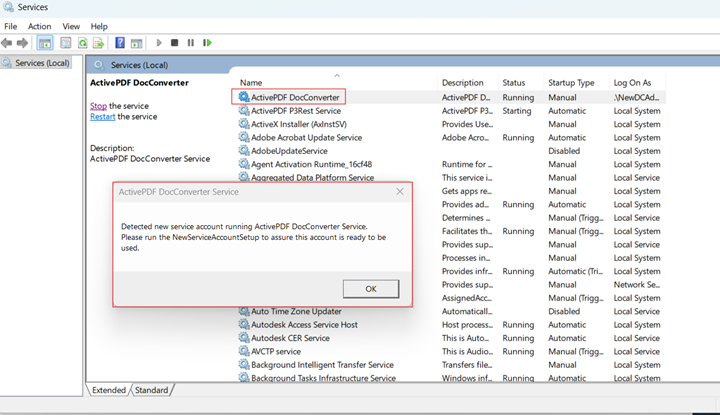
Scenario 2: Running a conversion
DocConverter compares the current Windows service logon account against the account stored in DCService.json. If they do not match, the warning is generated.

Does the warning indicate that the service account configuration is incomplete or invalid?
No. The warning simply indicates that DocConverter has detected a change in the configured service account. The NewServiceAccountSetup utility should be run so the required DCOM permissions are assigned to the new account.
Can an Office or DocConverter upgrade trigger this warning?
Installing a new version of Microsoft Office should not trigger this warning. The warning is typically caused only when the DocConverter service account has been changed.
During installation, DocConverter creates and configures a default account named DCAdministrator, or the account designated during installation, and assigns the necessary DCOM permissions. If the service account is changed, the permissions must be updated by running NewServiceAccountSetup.
Is the warning related to Excel conversion failures?
Possibly, but not always. While the warning may be informational, it should be resolved to eliminate service account permissions as a potential cause. If the issue persists, the root cause may be a damaged or incomplete Microsoft Excel installation, and an Office repair may resolve the problem.
Summary
The NewServiceAccountSetup utility ensures that the configured DocConverter service account has the correct DCOM permissions. The warning is generated whenever DocConverter detects that the service logon account differs from the account stored in DCService.json. Although the warning may not directly cause conversion failures, it should be addressed because incorrect DCOM permissions can prevent Office-to-PDF conversions from functioning correctly.